
Recommended Cameras for PhotoRobot Systems
The following guide aims to assist PhotoRobot customers in choosing the best recommended camera and lens combination(s) to use with PhotoRobot systems. It provides two simple steps to configure a fully PhotoRobot-ready camera and lens kit with all accessories and training included. There is general information as well as technical specifications to consider before making a purchase, with detailed overviews of camera model and lens selection. This includes suggestions for choosing high-end versus budget-friendly equipment around performance, budget, use case and workflow requirements.
Note: Refer to PhotoRobot Compatible Cameras for the complete list of supported Canon and 3rd party camera models. For better understanding on the impact of camera resolution, visit the PhotoRobot Camera Resolution Guide.
Suggested Cameras for General Use
For frictionless operation, it is currently advisable to select mirrorless camera models for operation with PhotoRobot systems.
Mirrorless cameras (CSCs) are compact cameras, also with interchangeable lenses, which can be controlled using software drivers. The absence of a mirror amounts to smaller dimensions and a lighter weight. At the same time, mirrorless cameras retain the primary advantages of SLR cameras (the interchangeable lenses, and large sensor).
Important: PhotoRobot continuously monitors the latest trends in mirrorless cameras (Nikon, Sony and others). However, due to the availability of software drivers, cameras by Canon are recommended for operation with PhotoRobot Controls App.
Recommended Cameras for Special Applications
For special applications, it is possible to connect high-speed and high-resolution cameras to a PhotoRobot system. However, selection of a camera for special applications should always be after prior consultation with a PhotoRobot specialist.
- Special applications include for instance using high-speed, high-resolution cameras in museum and archive photography, as well as the digitization of items using 3D modeling.
- Take for example a system featuring the PhotoRobot Centerless Table. The Centerless Table is able to rotate the subject 360 degrees in less than 3 seconds. At the same time, the software sends a signal to the camera to capture 36 or more images.
- This case means that the standard camera and studio light configuration will not suffice. Instead, only a high-speed camera is able to meet the photographic requirements to automate photography and generate a 3D model from photos.
- The camera must capture often at least 30GB of data in less than 2 minutes, photographing the item from both upper and lower hemispheres.
In use, solutions like these are more common in museums, such as for archiving collection items. The recommended camera in this case may then be camera models such as from Hasselblad, Sinar, and others. To create certain types of 3D models from photos, it might be a higher speed camera such as industrial models from FLIR. In either case though, always first consult with a PhotoRobot technician to find the optimal camera for special applications.
Before Purchasing a Recommended Camera
Always remember to contact PhotoRobot before purchasing a recommended camera.
The PhotoRobot solution is able to control cameras via software using a USB cable. Therefore, it is possible to set the time, aperture, ISO sensitivity and other settings while monitoring the scene through live-view. If the camera does not support these functions, manual control (or via software control supplied with the camera) is possible. Capturing images is then controlled via the robot using a remote shutter release cable.
Note: It will always be necessary to inform PhotoRobot of your camera selection. This is so PhotoRobot can prepare a special shutter cable with a camera-specific connector. For the types of shutter connectors compatible with different camera specifications, refer to Canon Wireless and Wired Remote Controls.
Camera Compatibility with PhotoRobot
For maximum use of the camera’s capabilities, a compatible Canon camera model is recommended. Using a recommended Canon camera will ensure full software support and the greatest compatibility with PhotoRobot.
Despite basic compatibility, camera models which do not appear on the recommended list may experience limitations. For example, some cameras will not accurately function during non-stop rotation of the item. In this case, extremely high accuracy is necessary to synchronize the camera shutter with the robot’s movement. This requires testing of the specific model if using a camera not from the recommended lineup.
For this reason, always choose one of the recommended Canon camera models with full support when possible.
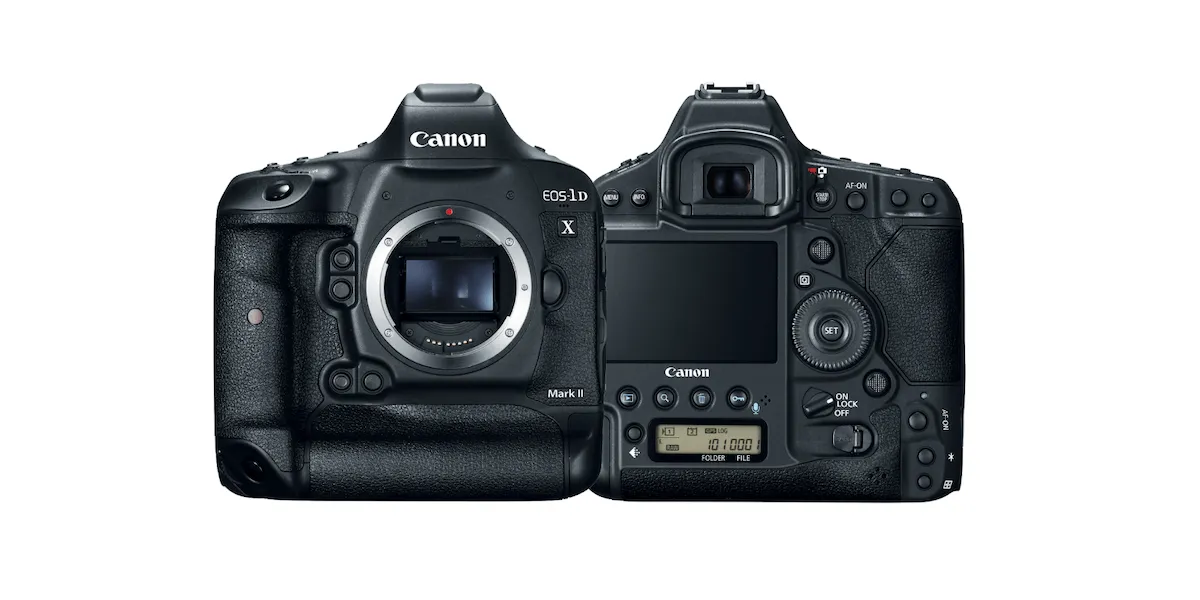
Camera Specification Considerations
Shooting Speed
In regards to camera shooting speed, note the following information.
- Less expensive camera models usually do not enable picture taking at the required frequency in the external control mode. This subsequently slows down the entire shooting process when operating the machines in non-stop spin mode at high speeds of movement.
- Using only a high-end camera is not enough to achieve non-stop spin photography.
- Both a high-speed camera and high-speed Broncolor studio lights are necessary to support the high speeds of movement.
- Budget lights recharge slowly, meaning the camera also must capture too slowly.
Also note that when photographing products, the traditional approach is to stop the item’s movement at each selected angle. The still subject is then photographed, before restarting object rotation to the next angle to stop at and capture.
However, to increase overall productivity, PhotoRobot is able to photograph items in non-stop spin mode, without stopping the rotation of the turntable. This accelerates production speeds by sometimes up to 4 times in comparison to the traditional start-stop capture approach. PhotoRobot systems monitor the movement of the subject at approximately 1000 times per second. The software then sends signals to trigger the camera precisely before the moment of capture.
This requires high shooting speeds in order to accurately and consistently capture the subject at the exact angle in relation to the camera. If the shooting speed of the camera is insufficient, the robots must then operate at a fraction of their maximum speed.
Camera Interface Speed (USB)
The camera interface speed is another important consideration to avoid any limitations in download and overall production speeds.
- It is not recommended to use cameras with a slower interface than USB 3.0. (Anything slower causes the robot to wait for images to download to the computer, slowing down the entire digitization process.)
- A standard USB cable length covers the distance from the camera to the control unit and computer up to 5 meters. (This is the same length as the shutter release cable as well.)
- The maximum length connection for both cables capturing images in the highest resolution has been up to 15 meters using a special configuration with an active USB 3.0 extension. (Although, note that cases such as these can have a major impact on choice of camera.)
Resolution and Quality of Image Sensor
In terms of the recommended camera resolution and image sensor quality, it is important to take into account the following considerations.
- In addition to the quality of lighting, the quality and resolution of the image sensor have a fundamental impact on the quality of images.
- Both the resolution and sensor are a factor in digital media that allows zoom, and in which quality of detail is crucial.
- The resolution and sensor must also be suitable to capture images for use in print in which similar criteria apply.
Thus, the general recommendation is that camera resolution be no less than 18 MPx, and ideally between 24 - 50 MPx. (Higher resolution cameras are often insufficient due to the longer transmission and processing times of the acquired volumes of data.)
Purchase Price of the Entire System
It may also be important to consider the purchase price of the entire system including the robots, all required cameras, lenses, and equipment. For example:
- Using a PhotoRobot multi-camera system such as the MultiCam requires an estimate of how many cameras will be in use at one time. The system technically scans an object from several angles simultaneously using multiple cameras.
- Systems such as these call for consideration of the total number of cameras when estimating the total cost of the acquisition.
- The more cameras, the higher the productivity of the entire workstation. Although, this is more evident in larger setups, in which the increased input on investment amounts to greater productivity in the end.
Note: To estimate the cost of the computer(s) in the purchase price of the entire system, refer to PhotoRobot System Requirements. Find recommended hardware specifications and recommended computers for operation of PhotoRobot Controls Application on macOS and Windows operating systems. The information includes equipment and cable recommendations, as well as suitable scanners to use with PhotoRobot systems.
Camera Integration Requirements
When selecting a camera, first always refer to the complete and updated list of cameras compatible with PhotoRobot. Then, carefully consider not only the image resolution but also the interface speed. The interface speed is especially important for connecting the camera to the computer. For example, devices with a slower connection than USB 3.0 will slow down the overall production process. The slower speeds force the robot to wait while downloading the images from the camera.
Note: There is no support for Wi-Fi camera connection for sequence shooting – particularly continuous, non-stop capture. This is due to the slower speed and instability over Wi-Fi connection. Although, sometimes there is no option other than wireless shooting, such as photographing larger products and their details by hand – furniture, carpets, etc. For these situations, wireless cameras can be used despite the disconnection issues.
Alternatively, it is possible to use an iPhone for effective handheld and detailed photography via the PhotoRobot Touch App. PhotoRobot Touch enables direct iPhone - Cloud connection, communication directly with the local _Controls computer, and data transfer over the local network. The iPhone also functions as a barcode scanner for 2D and 3D codes, and the UI for working with the system.
In general, note that among the main camera performance requirements, it is important to have:
- High shooting speed (using fast shot mode takes approximately 20 seconds or less for the whole rotation of the object).
- High resolution.
- A full-frame image sensor (36 x 24 mm).
Further, during the selection process of the camera model, always keep in mind that:
- There is a higher shooting speed requirement with PhotoRobot than most competing systems.
- A resolution of between 24 MPx to 45 MPx is most often sufficient.
- Affordable models with a smaller APS-C sensor can be a disadvantage.
- There might be higher image download speeds due to lower resolution.
Also note that while a basic range economy-cost camera can offer a lower purchase price, they come at the tradeoff of higher image download speeds and thus lower reliability due to lower resolution.
PhotoRobot-Ready Recommended Camera & Lens Kits
To simplify the camera & lens selection process, there are PhotoRobot-ready camera & lens kits which are suitable to meet the needs for most customer applications.
Simply choose a camera based on your performance needs and budget, and choose a compatible lens according to your workflow.
PhotoRobot supports multiple Canon cameras. However, for the best results and smoothest production workflow, we recommend the following proven camera and lens combinations. Each option offers optimal balancing with PhotoRobot lighting, automation, and image processing pipelines.
Every recommended camera and lens choice is then delivered as part of a complete PhotoRobot-ready kit (with power cables, polarization, adapters, tested compatibility, and onboarding included).
How to Choose a PhotoRobot Camera Kit (in 2 Steps)
Step 1: Choose a Camera
Select a camera according to the tier that matches your output quality requirements, speed, and budget.
Step 2: Choose a Lens
Choose a lens based on the types of objects you photograph, and how you intend to use it (universally, for macro photography, or multi-camera consistency).
Result: PhotoRobot-Ready Kit for Delivery
After choosing the camera and lens that meets your business’ needs, PhotoRobot delivers the PhotoRobot-ready kit with all accessories and training included.
Step 1: Select Your Camera (Performance / Budget)
There are currently three tiers of recommended Canon camera models, selected for their long-term stability and professional output in PhotoRobot workflows. Choose a camera from one of the tiers based on your performance requirements and budget.
- High-End: Canon EOS R5 Mark II
- Mid-Range: Canon EOS R6 Mark III or EOS R6 Mark II
- Economy Option: Canon EOS R8
High-End: Canon EOS R5 Mark II
The Canon EOS R5 Mark II is the high-end tier camera at a higher cost but offering the best performance with no compromise.
- Best For: Premium e-commerce content, high detail, multi-camera systems
- Key Advantages: Highest resolution, best image quality, fast performance
- Recommended For: Maximum quality without compromise
- Approximate Price: EUR €3,350 – €3,800 (USD $3,900+)
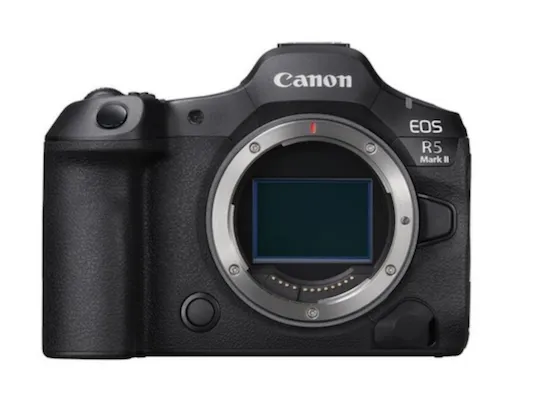
Full Frame 45 MPx
(36 × 24 mm)
Lens mount RF
Burst 12 fps mechanical shutter / 30 fps el. shutter
USB 3.2 (USB-C), Wi-Fi, Bt
Mid-Range: Canon EOS R6 Mark III or Canon EOS R6 Mark II
The mid-range tier of PhotoRobot-ready cameras includes two options: the EOS R6 Mark III, or the EOS R6 Mark II. Choose one based on your budget and performance needs. Both offer exceptional performance at a mid-range cost, while the Mark III is the higher-end option of the two. For the higher cost, the Mark III boasts 32 MPx, 7K RAW Video, a CF Express card for better and faster data flow, and full-size HDMI.
- Best For: Premium e-commerce content, high detail, multi-camera systems
- Key Advantages: High resolution, superb image quality, great performance
- Recommended For: Strong all-around camera performance at mid-range cost
- Approximate Price (R6 Mark III): EUR €3,100+ (USD $3,600)
- Approximate Price (R6 Mark II): EUR €2,240+ (USD $2,600)
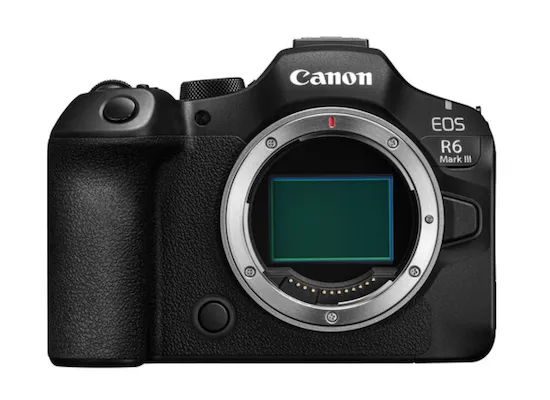
Full Frame 32.5 MPx (36 x 24 mm)
Lens mount RF
Burst 12 fps mechanical shutter / 40 fps el. shutter
USB 3.2 (USB-C), Wi-Fi, Bt
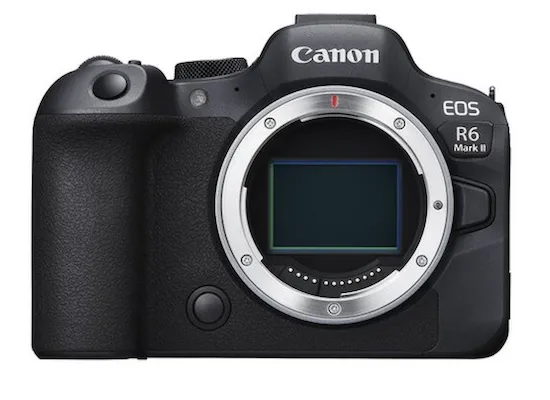
Full Frame 24.2 MPx (36 x 24 mm)
Lens mount RF
Burst 12 fps mechanical shutter / 40 fps el. shutter
USB 3.2 (USB-C), Wi-Fi, Bt
Economy Option: Canon EOS R8
The Canon R8 is the economy option offering exceptional value at a lower cost.
- Best For: Most e-commerce workflows, excellent value
- Key Advantages: Modern sensor, fast operation, great results
- Recommended For: Strong all-around performance for the cost
- Approximate Price: EUR €1,120 – €1,415 (USD $1,300+)
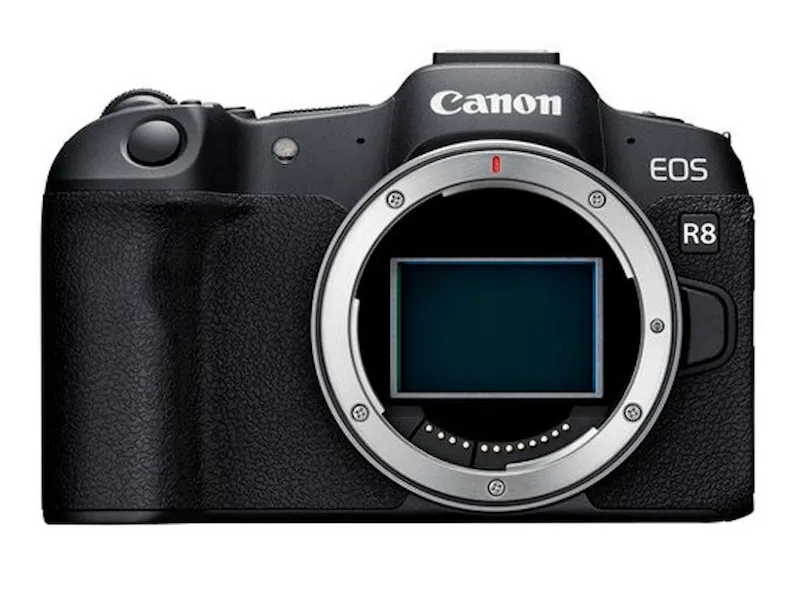
Full Frame 24.2 MPx (36 × 24 mm)
Lens mount RF
Burst 12 fps mechanical shutter / 40 fps el. shutter
USB 3.2 (USB-C), Wi-Fi, Bt
Recommended Cameras Quick Comparison Table
Step 2: Select Your Lens (Workflow / Use Case)
Next, select a lens that supports your workflow and use case. While the camera choice defines the performance tier, the lens choice defines how you work. Choose a lens around the types of objects you photograph and your professional production workflows.
- Zoom lens (Universal, robotic arm / tripod use)
- Macro lens (Macro / detail, close-up photography)
- Prime lens (Fixed focal, multi-camera synchronization)
Zoom Lens (Universal, Robotic Arm / Tripod)
Zoom lenses support universal product photography applications, and photo studio production using a tripod or PhotoRobot Robotic Arm. The suggested zoom lens is the Canon RF 24-105mm Zoom Lens (f/4.0 L IS USM). Although use of the higher-end Canon RF 24-105mm (f/2.8 L IS USM Z) is also possible and the highest quality option in general, there is a significant price difference. Meanwhile, the f/4.0 remains perfectly suitable for the majority of applications. The lens is compatible with all PhotoRobot recommended EOS cameras, and it allows for the optional attachment of a Power Zoom Adapter. When in use, a Power Zoom Adapter enables electronic adjustment of the focal length. This offers a technically sound solution for photographing various subjects in which you must zoom in and zoom out, as it eliminates the need to tape the lens in place. Instead, the focal length remains in the set position with the Power Zoom Adapter.
- Suggested Zoom Lens: Canon RF 24-105mm (f/4.0 L IS USM) Zoom Lens
- Best For: Universal product photography, use with a Robotic Arm / tripod
- Typical Use: Products of varying sizes, fast setup changes
- Advantages: Flexible framing, one lens for many products
- Note: Compatible with Power Zoom Adapter for electronic adjustment of focal length
- Approximate Price: EUR €1,115 – €1,200 (USD $1,300+)
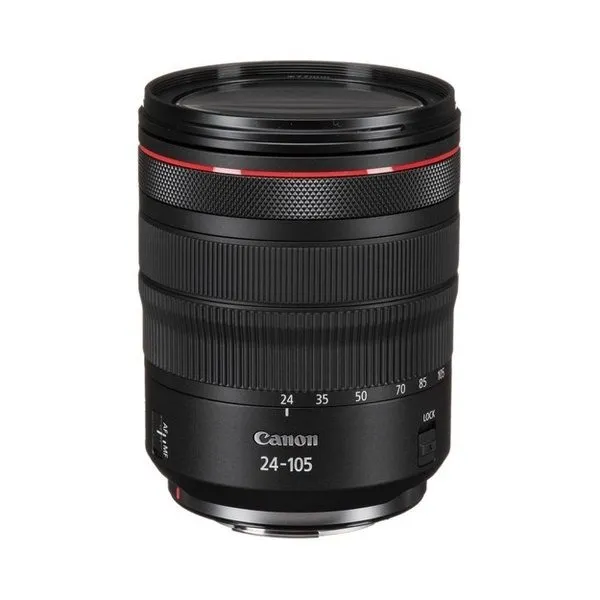
f/4.0 L IS USM
f4 - f22
Angle of view 84º to 23º 20’
77 mm filter
*For Full Frame Canon EOS R(x) mirrorless series only
Macro Lens (Macro / Detail, Close-Up)
Macro lenses support workflows involving close-up, detail / macro photography, and wireless handheld shooting. The suggested macro lens with PhotoRobot recommended cameras is the Canon RF 100mm Macro Lens (f/2.8 L Macro IS USM). While PhotoRobot recommended cameras have IBIS technology to counteract camera shake and achieve sharper images, there is also a compatible camera grip if using the recommended higher tier Canon EOS R5 Mark II. The Canon BG-R10 Battery Grip attaches to the EOS R5 Mark II to offer greater ergonomics when photographing from portrait positions.
- Suggested Macro Lens: Canon RF 100mm (f/2.8 L Macro IS USM)
- Best For: Close-up, detail / macro photography and handheld shooting
- Typical Use: Photography of jewelry, watches, textures, fine product detail
- Advantages: Maximum sharpness and detail rendering
- Note: Compatible with the EOS R5 Mark II camera to also support attachment of a battery grip for greater stability and ergonomics
- Approximate Price: EUR €1,075 – €1,160 (USD $1,250+)
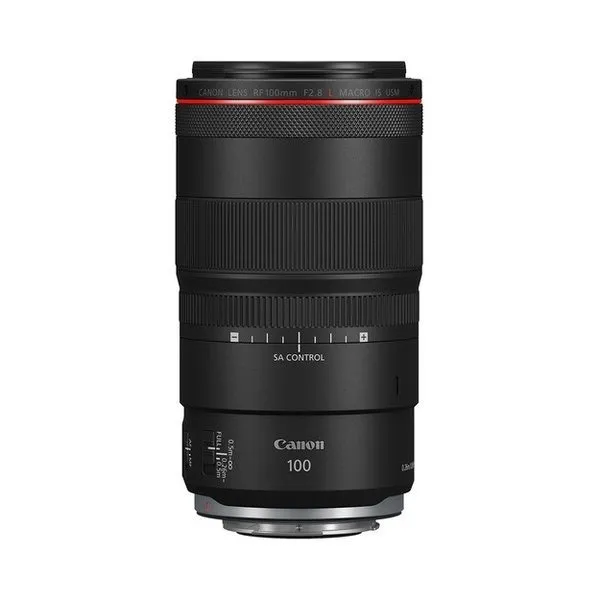
f/2.8 L Macro IS USM
f2.8 - f32
Angle of view 24º
67 mm filter
Prime Lens (Fixed Focal, Multi-Camera Sync)
Prime lenses support workflows incorporating the PhotoRobot MultiCam system for the synchronization of multiple cameras and multi-camera capture. The suggested prime lens is the Canon RF 50mm Prime Lens. It is compatible with all PhotoRobot recommended EOS camera models. The lens attaches to a single camera in a multi-camera system so that it can technically scan an object with additional cameras simultaneously, capturing several angles at the same time. Although note that this means the number of lenses for each system will depend on the customer’s requirements, and how many cameras are in use in their setup. In larger setups, more cameras and lenses will be recommended in order to enhance the productivity of the entire workstation.
- Suggested Prime Lens: Canon RF 50mm Prime Lens
- Best For: Multi-camera workflows and consistent product sequences
- Typical Use: Multi-angle capture, synchronized camera setups
- Advantages: Identical perspective across multiple cameras, better optical performance
- Note: Total number of cameras with prime lenses required for a multi-camera system varies depending on customer requirements and setup
- Approximate Price: EUR €1,245 – €1,330 (USD $1,450+)
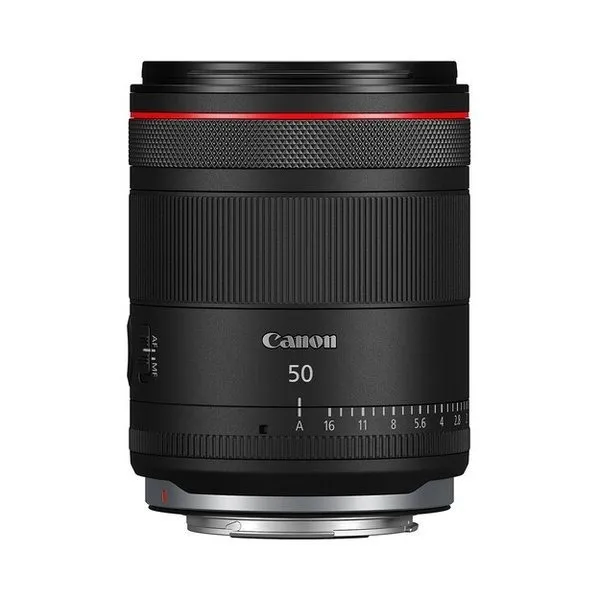
f/1.4 L VCM
f1.4 - f16
Angle of view 46º
67 mm filter
*For Full Frame Canon EOS R(x) mirrorless series only
Note: Why Choose a Prime Lens
Prime lenses (fixed focal) are recommended for professional, multi-camera workflows. The prime lens is able to obtain an identical perspective when using multiple cameras. This enables multi-camera capture within the same product sequence, which is essential when matching perspectives is crucial. The prime lenses help to maintain visual consistency across angles and shots.
At the same time, prime lenses provide greater optical rendering than zoom lenses. They typically deliver sharper detail, cleaner rendering, and fewer optical compromises. This is why the prime lens is ideal and recommended for premium product photography outputs. The prime lens ensures both high-level consistency, and maximum sharpness.
Recommended Lenses Quick Comparison
Camera and Lens Compatibility Summary Table
Any combination of PhotoRobot recommended cameras and lenses is possible.
What is Included in Every PhotoRobot-Ready Camera Kit?
PhotoRobot recommended camera kits are much more than only “a camera in a box.” Each camera kit is a ready-to-run production module configured for the PhotoRobot workflow.
Included in every standard camera and lens kit, there are:
- Camera and lens;
- Flash trigger;
- Camera-to-control unit connection;
- Camera power supply (AC adapter);
- Camera power supply (external battery block for off-grid power);
- Active USB cable for camera-to-computer connectivity;
- Polarizing filter;
- Transport packaging;
- Installation and initial training (remote or on-site).
Everything within each kit is tested, prepared, and aligned with PhotoRobot lighting, automation, and post-processing workflows.
In some cases, a Power Zoom Adapter and / or ergonomic battery grip may also be included with the kit to complement the selection of compatible cameras and lenses. These add-ons can provide greater versatility and productivity in specialized workflows.
Other Compatible Canon Camera Models
While there is a wider range of PhotoRobot compatible Canon cameras, PhotoRobot is designed to deliver premium and consistent output across the entire workflow. This includes lighting, automation, and image processing. That is why PhotoRobot primarily recommends the camera models and lenses in this documentation. Although, if budget requirements demand, it is possible to configure an entry-level solution using a compatible Canon camera. This can be suitable for basic automation and less demanding workflows.
Using PhotoRobot Touch for Handheld Shots
As an optional expansion, the PhotoRobot Touch App is an iOS application which connects to PhotoRobot Control App. PhotoRobot Touch enables the use of a supported iPhone as an external wireless camera. It allows for batch handheld product photography in unrestricted or wizard-based capture modes.
Note: Product photography by PhotoRobot Touch is possible using only continuous lighting. Strobe lights are not compatible for this use case. For additional information on installation and use of PhotoRobot Touch, refer to the Touch App User Support Guide.
FAQs About PhotoRobot-Ready Camera Kits
Can I change the lens later?
Of course, it is possible to change lenses at any time. Lens choice can be adapted to your workflow and use case.
Why do you include a polarizing filter?
A polarizing filter improves compatibility with PhotoRobot lighting and helps to reduce reflections on many product surfaces.
Is EOS R8 enough for production use?
The Canon EOS R8 model is perfectly suitable for most workflows, and it is a great option for its performance and cost if on a budget.
When do I need a prime lens?
If you use multiple cameras or want the most consistent perspective and best optical quality, a prime lens is recommended.
For Help Selecting Your Camera and Lens
Would you prefer professional assistance in choosing the best camera and lens kit for your business?
Contact PhotoRobot specialist technicians for recommendations depending on your workflow and budget.
Additional Notes: Camera Lens Selection Overview
In general, prime lenses (also fixed focal length lenses) have better optical properties than zoom lenses. Thus, if the situation allows, PhotoRobot will recommend the use of a prime lens. However, this means that if a different focal length is necessary, it requires exchanging the lens. Keep this in consideration especially when photographing different sizes of products which might fall out of frame.
For example, using zoom lenses in scenarios involving multiple cameras at one site may complicate production workflows. Complications occur for instance due to unevenly set focal lengths, meaning images from different cameras result in images of different sizes. (Note that this issue does not arise when using only a single camera in one robotic workstation.)
Regarding the quality of the lenses, PhotoRobot always takes into account user reviews and official information from the manufacturers. Additionally, in most cases, PhotoRobot recommends practical testing to help customers choose the appropriate lenses. For this, PhotoRobot has a wide range of lenses available for on-site testing.
Note: For more detailed information, see the manufacturer’s technical specifications for a comparison of the different lenses.
Appropriate Focal Length
The human eye perceives the focal length of 50 mm from a full-frame camera as perfectly natural in dimensions. If looking through the lens using a wider focus, the perspective distorts either slightly or enough to appear completely unnatural in extreme cases.
Conversely, a longer focal length allows for better utilization of the entire sensor area. This results in a higher resolution of captured images (after cropping).
If the photos you capture are for the creation of 3D models, it is necessary to adjust the focal length of the lenses according to the 3D modeling method. For example, many methods require a 35 - 50 mm lens for better triangulation.
Nomogram: Ceiling Height, Camera Distance, Lens Focal Length
A nomogram accounting for the studio ceiling height, camera distance, and lens focal length helps to better understand multi-camera installation requirements.
For example, in order to plan the location for a robot installation, it is necessary to account for common issues which might occur relating to selected focal length. In some issues, the selected lens focal length requires a distance from the subject that is not available due to the studio ceiling height. If this is the case, it is then necessary to consider either a wider lens, or using a different location for the machine installation. See the following nomogram for demonstration.
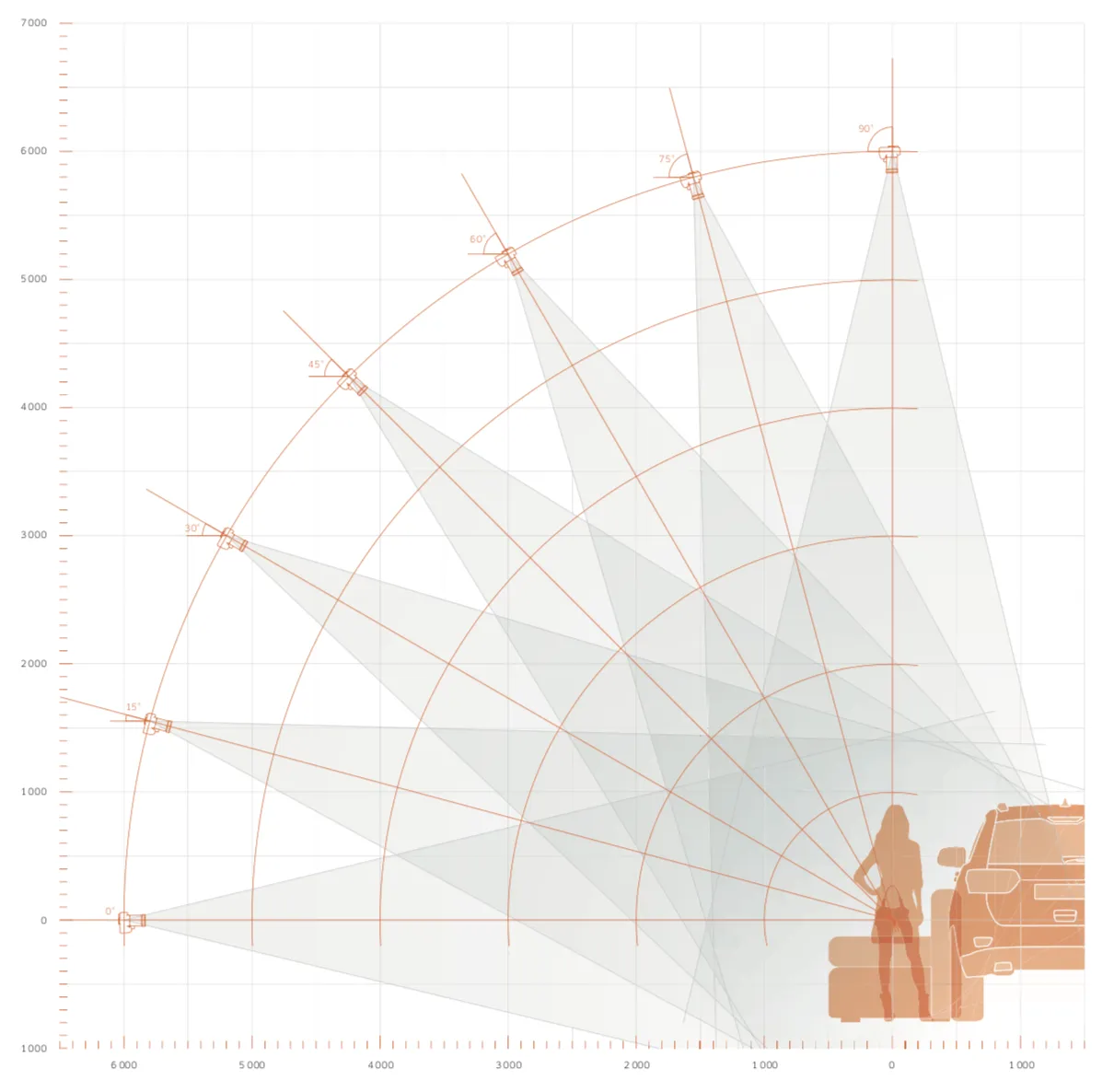
The above nomogram represents a lens with a focal length of 50mm using a full-frame DSLR camera (with a 36 x 24 mm sensor). Note: This is a general example for illustrative purposes only. Always first consult with PhotoRobot for focal length testing prior to lens selection for your specific installation.
Nomogram: Subject Distance and Focal Length
Compare the above nomogram to the one below. The one below represents a focal length difference from the camera to the subject from 14 mm up to 135 mm using a full-frame DSLR camera (36 x 24 mm sensor).
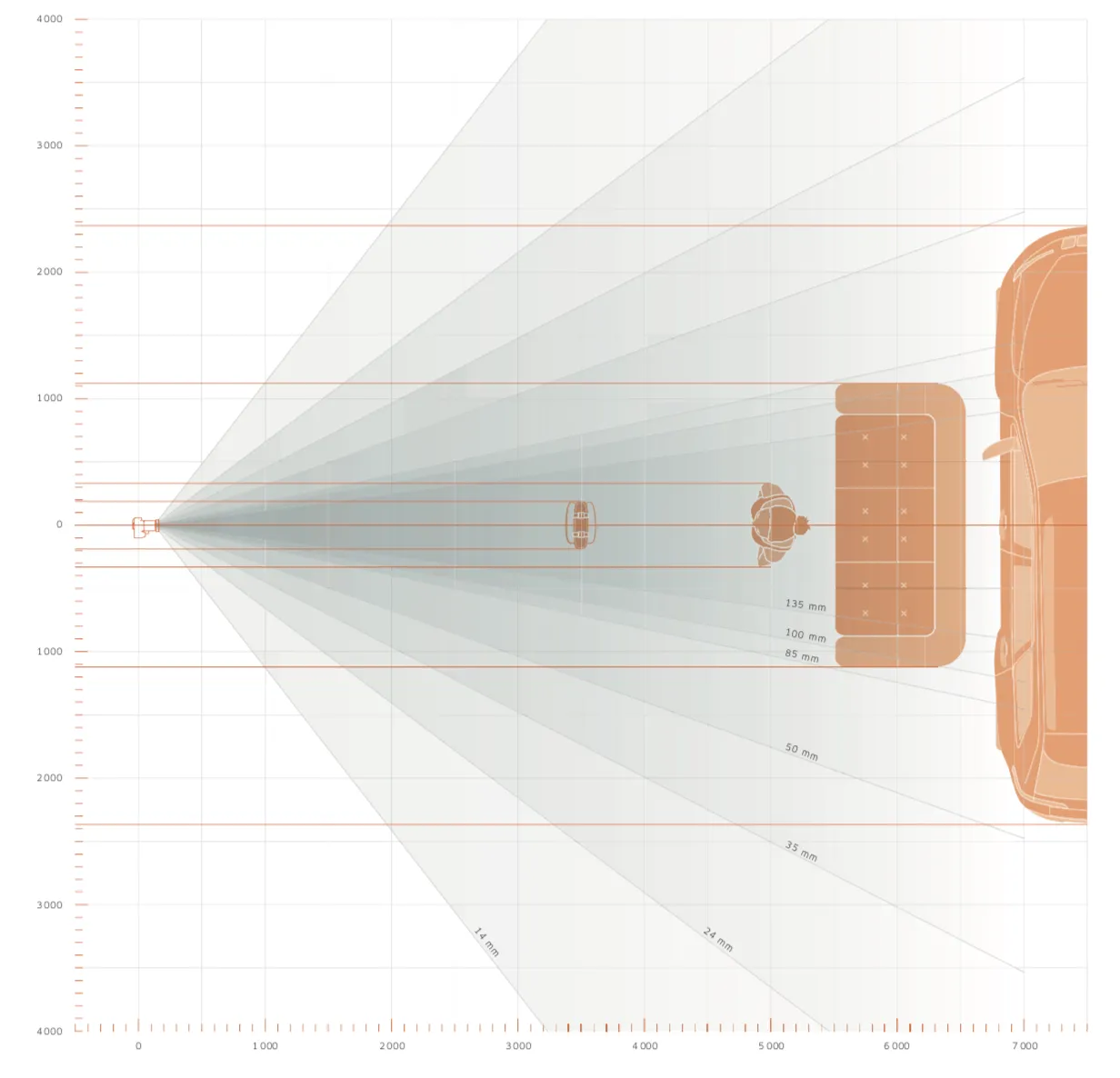
Note: The above nomogram is for general illustrative purposes only. Remember to always consult with PhotoRobot prior to lens selection for precise focal length testing for your specific installation.
For reference, use the PhotoRobot Depth of Field Calculator to estimate near and far focus limits, total depth of field, and the hyperfocal distance for any combination of focal length, aperture, sensor format, and subject distance.
Additionally, refer to the PhotoRobot Depth of Field Chart to quickly find total depth of field for common subject distances and apertures.
EF Lens Compatibility with EOS R Cameras
The Mount Adapter EF-EOS R allows for the utilization of any Canon EF lens with the EOS R camera. This way, it is possible to use your existing lenses with the compatible cameras. The Mount Adapter EF-EOS R is also lightweight, compact, and easy to attach. This ensures performance with EF and EF-S lenses without compromising functionality, speed, or quality. (Also note that Canon RF lenses are mounted onto EOS R cameras without any adapter.)
Polarizing Light Filter General Use
To minimize reflections, using a polarizing filter on the lens will often be recommended with PhotoRobot systems. Note: Most filters on the market are circular polarizers, which function by rotating the filter to reduce surface glare. The issue that arises with this in spin photography (when the subject is rotating) becomes the effectiveness of the circular polarizer, which may be reduced or unpredictable. In these cases, use of polarized light sources, ring flashes, and other special lighting solutions might be more effective.
If this functionality is required by the customer, the PhotoRobot team will prepare individual configurations for related product ranges and optimal image quality. The process ensures the highest level of quality tailorable to specific demands, and maximum productivity of the workstation.
Tripod Head Selection
Using an adequate tripod head is recommended for accurate and easy adjustment of the position of the camera and the lens. In this regard, there are a wide range of geared and ball tripod heads. However, PhotoRobot recommends using only geared heads.
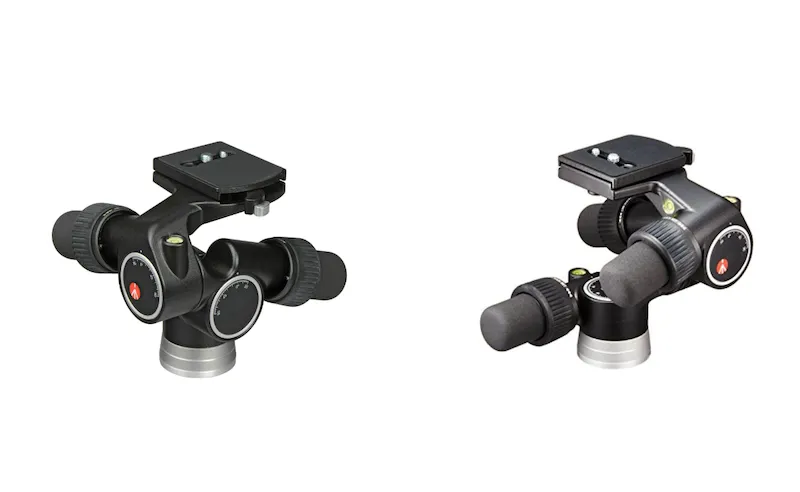
Specifically, the Manfrotto 405 Geared Head is recommended.
Comparatively, while ball tripod heads do allow for quick adjustment to any position, exact adjustment is often difficult to manage. Thus, after many years of experience, PhotoRobot uses and recommends only the proven Manfrotto 405 tripod head.
Manfrotto 405 Geared Tripod Head
The specifications of the Manfrotto 405 geared head follow for easy reference.
- Weight: 1.6 kg
- Head height: 16 cm
- Maximum load: 7.5 kg
- Quick release plate: 410PL
- Front: -30° +90°
- Lateral tilt: -90° + 30°
- Rubberized handles
- Aluminum alloy body
- Precise camera positioning in all axes (individually) by sliding bolts
- Disconnection mechanism for adjustment screws for rapid adjustment to remote positions


EOS Rebel Series


EOS DSLR Series


EOS M Mirrorless Series


PowerShot Series


Close-Up / Handheld

The Canon EOS Rebel Series offers beginner-friendly DSLR cameras with solid image quality, intuitive controls, and versatile features. Ideal for photography enthusiasts, these cameras provide reliable autofocus, vari-angle touchscreens, and Full HD or 4K video recording.
Connection
Resolution (MP)
Resolution
The Canon EOS DSLR Series delivers high-quality images, fast autofocus, and versatility, making it ideal for both photography and video production.
Connection
Resolution (MP)
Resolution
The Canon EOS M Mirrorless Series combines compact design with DSLR-like performance. Featuring interchangeable lenses, fast autofocus, and high-quality image sensors, these cameras are great for travelers and content creators seeking portability without sacrificing image quality.
Connection
Resolution (MP)
Resolution
The Canon PowerShot Series offers compact, user-friendly cameras for casual shooters and enthusiasts. With models ranging from simple point-and-shoots to advanced zoom cameras, they provide convenience, solid image quality, and features like image stabilization and 4K video.
Connection
Resolution (MP)
Resolution
The Canon Close-Up & Handheld Cameras are designed for detailed, up-close photography and video. Compact and easy to use, they offer precision focus, high-resolution imaging, and versatile macro capabilities—perfect for vlogging, product photography, and creative close-ups.


